Activating Model
The model as chosen by the Active Player currently resolving its action.
Link to original
Active Player
The player whose turn it is to activate a model.
Link to original
Base-to-Base (BtB)
A model is in BtB with another model if their bases are physically touching.
Link to original
An Activating Model not in BtB already can only enter BtB with 1 Enemy model per activation.
Some ranges are specified as BtB rather than in inches.
Battlefield
A game of Bushido takes place on a 2’x2’ area we call the Battlefield.
Link to original
Models on the Battlefield or designated as being Elsewhere are In Play.
Controller
The player with whom a model is currently Friendly.
Link to original
Counters
Counters are named for the effect that requires them and may be used to count turns, activations, or some other timing effect before they expire.
Link to original
Activation Counters are a particular type of counter. These show how many activations a model can make this turn.
See Condition.
Cover
A model benefits from Cover from an Enemy model if any straight line from the Enemy passes through an Obscuring or Blocking terrain element that is within 1” of the Target model.
Link to original
Damage
A model is Damaged or takes Damage when it suffers wounds or its wound boxes are marked.
Link to original
Model A deals or causes damage when a model has wound boxes marked due to an effect on model A or an action taken by model A.
Damage Roll
A roll using 2D6, applying any negative or positive Modifiers then cross-referencing on the Wound Table in the column equal to the Success Level of the tests, to see the number of wounds inflicted on a model.
Link to original
Deploy
When a model is first put into play it is Deployed onto the Battlefield.
After Terrain is Set Up, any effects that add more terrain to the Battlefield may also say they are Deployed. This is not a Move or Place.
A model may not be Deployed into BtB with an Enemy model or in an Enemy Model’s ZoC.
Models are Deployed with no Activation Counters.Link to originalNOTE
Terrain instead follows the Terrain Rules and any restrictions for the effect putting terrain into play.
Dice Rolls
Bushido uses ordinary six-sided dice.
When a dice is rolled, the number given is referred to as the value on the dice.We use dice in the following ways:
- D6: The number shown on a single six-sided dice roll
- 2D6: Two dice added together to give a value between 2 and 12
- D3: Roll a D6. A roll of 1-2=1, 3-4=2, 5-6=3.
- D2: Roll a D6. A roll of 1-3=1, 4-6=2.
Some abilities call for a coin flip; this can be represented with a D2 if needed.
In some instances a random model or other element may need to be selected, any straightforward method should suffice such as assigning each a number then rolling a dice.
Link to original
Effects
This is a catch-all term for various rules including Ki Feats, Theme bonuses, Unique Effects, Event Cards or others.
Link to original
Usually, for timing we say “Effects that happen in this phase” or similar; this means any rule that says it happens in that phase.
Elsewhere
Elsewhere is a specific place for models in play but not on the Battlefield.
Link to original
These may be Flanking troops, models flying high over the battle or fighting on another plane of existence.
Models Elsewhere generate Ki Tokens as usual and are affected by traits and states (such as Regenerate and On Fire). They cannot have Activation Counters, and cannot spend tokens.
Enemy/Friendly
Models can either be Friendly or Enemy, depending on which player’s Warband they are in.
Link to original
Models in a player’s own Warband are considered Friendly.
Models in an Opponent’s Warband are considered Enemy.
Entering
During any move, the first time a model comes into contact with an area of the Battlefield, terrain element, or named effect it is considered to Enter that area, terrain, or effect.
Link to original
If an effect is over multiple areas or terrain elements (e.g. Void Rifts) the model only Enters the effect the first time it contacts the effect.
If a model is Placed into an area of the Battlefield, terrain element, or named effect it is considered to Enter that area, terrain or effect.
Exhausted
A model with no Activation Counters is considered Exhausted.
Link to original
Facing
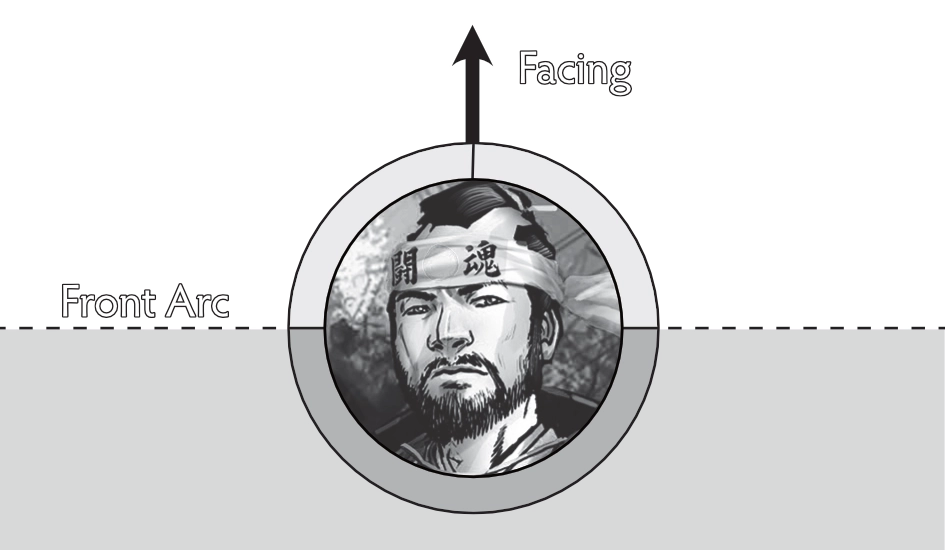
A model’s Facing line is directly in the centre of the front of its base. It should be marked with a line or dot on the model’s base.
Ninety degrees either side of a model’s facing line shows its Front Arc and should be marked on the model’s base with lines or dots.
A model is Facing anything forward of its Front Arc.
A model is Directly Facing anything in front of its facing line.Link to original
Faction
Models have a Faction Icon to denote which of the many warring factions from the Jwar Isles they belong to.
Link to original
If a rule references a Faction, it refers to the Faction Icon printed on the front of the model’s card.
Generate Ki
Generate refers to gaining Ki in the starting phase, step 2. Any other time a model gains Ki it is not Generated unless specifically stated.
Link to original
Initiative
The model with the Initiative checks its Attack dice first in Melee Exchanges and declares the use of Ki Boosts and Ki Feats after their Opponent (See Melee Exchange).
Link to original
The Activating Model has the Initiative unless a trait, State or game Effects changes this.
In Play
A model is in play when it is on the Battlefield or Elsewhere.
Link to original
A model is not in play when not recruited into the Warband and/or has been Killed or removed from Play.
Ki Boost
A Ki Boost is a special type of Ki Feat that increases statistics.
Link to original
Killed
When a model has 0 wounds remaining on its Wound Track it is Killed, remove the model from the table.
Link to original
Line of Sight (LoS)
A model can draw LoS to points in its Facing. LoS is achieved if you can draw a straight line from any part of the origin model’s Base to a point in that origin model’s Facing.
Terrain and models block LoS except for the following:
- LoS is not blocked by models and Terrain elements smaller than the model LoS is being drawn to.
- LoS is not blocked by models (other than the model you are drawing LoS to) and Terrain elements smaller than the model drawing LoS.
LoS may be checked for any model (Friendly or Enemy) at any time.
Link to originalEXAMPLE
Model A has no LoS to Model B since Models E and D are blocking LoS.
Model C is Medium Sized, so has LoS to Model A, likewise Model A has LoS to Model C.
Markers
Markers are used to mark what States are currently affecting a model. See Model States.
Link to original
Measuring Distances
The unit of measure in Bushido is inches.
- Movement distances are measured from the nearest base edge to the point the model wishes to move following the route the model’s base will take.
- Targeting distances are measured from the nearest base edge of a model to the nearest base edge of the Target.
- Measurements, whether distances, LoS, or other measurements, may be taken at any time for any reason by either player.
- When measuring if a model or point is within a given range then precisely up to that range is considered within.
- If a range is given as BtB, then the model is in range of itself.
Example
If the edge of a model’s base is exactly 6” away from its Opponent’s base, it is considered to be within 6”.
Link to originalNOTE
In timed play, the player whose clock is running always has priority and should not be obstructed by their opponents’ measuring devices.
Modifiers
When a statistic is modified it can never go above double its base value.
If results are divided and leave fractions, always round down except in the case of distances, where fractions of inches are kept.
Numerical values of traits can be modified.If an effect requires dice to be substituted, the value of the dice is often fixed to some value. It is helpful to physically remove the dice and place it, showing that value, with the dice that were rolled.
If a dice is substituted, it cannot be re-rolled.If modifiers, rerolls, adding or removal of dice affect any roll then only after all of these have been resolved can a result be determined.
Link to original
Movement
Movement is measured using a tape measure (or other measuring devices).
If a model must move Toward another game element (such as another model or Terrain piece), then it cannot increase its distance from that element for any part of its movement.
If it must move Directly Toward a game element, then it can only move in a straight line drawn from the centre of its base to the centre of the game element.
Similarly, a model which must move Away cannot decrease its distance from that element for any part of its movement.If it must move Directly Away from a game element, then it can only move in a straight line drawn from the centre of its base away from the centre of the game element.
An Activating Model can only enter BtB with one Enemy model per activation.
Link to original
Open & Hidden Information
In Bushido, all information is ‘open’ unless explicitly stated otherwise.
Link to original
This means that both players are entitled to read any rules, stats, model cards, special cards or any other information pertinent to the game, unless the rules explicitly state the information is hidden.
Each player’s Hidden Information should be recorded on one sheet of paper and handed over after the game.
If you have a third party, they can be used to check hidden information during the game to make sure no mistakes happen.
Owner
A model’s owner is the player who initially recruited the model into their Warband or summoned the model, ignoring any control markers or game Effects.
Link to original
Place
Sometimes Models are Placed on the table instead of moving around the table.
Link to original
Replace
When a model is replaced, swap the model on the board with the new model. If the model was not in play, the new model is considered Deployed.
The player using the replacing effect chooses the new model’s Facing.
If the new model has a different sized base, then it must be placed so that the larger base entirely covers the area of the smaller base.If the model being replaced was in BtB with an Enemy model, the new model must be placed in BtB with the Enemy model if possible.
When 2 models swap positions, replace each model with the other model.
Link to original
Select
No [LoS](Line of Sight) is needed to select a model; selecting is not targeting.
Link to original
A model may select itself.
Size
Unless a model’s Size is stated as a trait, it is determined by its base.
- Small Base (30mm) = Small Size
- Medium Base (40mm) = Medium Size
- Large Base (50mm) = Large Size
- Huge Base (60mm) = Huge Size
Tiny and Huge models are indicated by Traits. Models with these Traits have the given size regardless of base size.
Link to original
Summon
When a model is Summoned to the game it is added to the Warband in addition to the models already recruited.
You do not need to pay the Rice Cost of a Summoned model.
Some models have Su as their Rice Cost, these can only enter play by being Summoned.When a non-unique model is Summoned to the game it never has any Enhancement - Equipment cards attached to its card.
Link to original
If a unique model that was recruited into the Warband is Summoned after being removed from the game, it retains any Enhancement - Equipment cards it was recruited with.
Supporting Dice
When making a Test, a maximum of 2 Dice are chosen as supporting dice, these each add +1 to the value of the highest [dice roll](Dice Rolls) to get the final result.
Link to original
Surprised
A model is Surprised if an Activating Enemy model that did not begin its activation in BtB, performs an action that Targets it or brings it into BtB and that Enemy model started outside of LoS and remains outside of LoS during Movement.
Surprised models may not declare Ki Feats or Ki Boosts, are always the Attacker second in Melee Exchanges, may not benefit from traits or effects that affect Initiative and suffer a -1 Melee Pool modifier.
Link to original
They may still declare Special Abilities (Attacks and Defences).
Models are only Surprised until the action in which they became Surprised is resolved.
Effects which are not Ki Feats may still be used.
Target
A model must be able to draw [LoS](Line of Sight) to another model to Target it.
Link to original
A model may always Target itself.
Test
Whenever a model attempts an action which may succeed or fail, its controlling player [rolls dice](Dice Rolls) to complete a Test.
Link to original
The value of the dice rolled will determine if the model succeeds or fails the test.
Timing
Any effect which does not specify when it can be used may be used any time.
The exception is during Melee Exchanges or Ranged Attacks, where the timing is restricted as detailed in the Melee Exchanges and Ranged Attacks section.Ki feats that state “when” they may be used can be used only when conditions are met. This can allow them to be used during melee exchanges and ranged attacks outside of the window normally allowed by those sections.
If both players wish to use such Effects the Active Player goes first.
If the trigger for using an effect is occurring while information is hidden then the effect may not be used.
Example
The Corruption of Virtue Event is used when an opponent uses a Virtue Token. If a Virtue Token is used, during a Melee Exchange to add more Special Ability options, this is designated Hidden Information. By the time the Player discovers the Virtue Token has been spent, the timing window for the trigger has passed and the Event cannot be used.
If an effect does not have a stated expiration time, it ends in the End Phase.
Link to original
Trap
Only one Trap Effect may be used per activation. The following are considered Traps:
Link to original
- Animal Trap, Pungi Pit Trap, Rope Trap Event Cards
- Deference and Snare Ki Feats Other trap cards released after this rulebook will include text identifying them as Traps.
Tokens
Tokens are used to track a model’s resources, such as Ki Tokens.
Link to original
Virtue Tokens
Many effects give out Virtue Tokens, most commonly the Virtue Trait.
This particular type of Token represents different benefits depending on the other models you recruit.When a Virtue Token is spent by the profile which has it, it chooses one of the available abilities. Some models have abilities that can only be used by spending a Virtue Token.
When a model spends a Virtue Token you may choose one permitted ability on the card of any Friendly model In Play.NOTE
The abilities usually say “This model…”. This refers to the model spending the token since that model gains the ability. You read it as if it were reading the spending model’s profile card.
Link to originalNOTE
Some models have abilities that are restricted to a certain group or even specific models; see individual cards for details.
Warband
A player’s Warband consists of recruited, Summoned and Controlled models as well as Special cards.
Link to original
Zone of Control (ZoC)
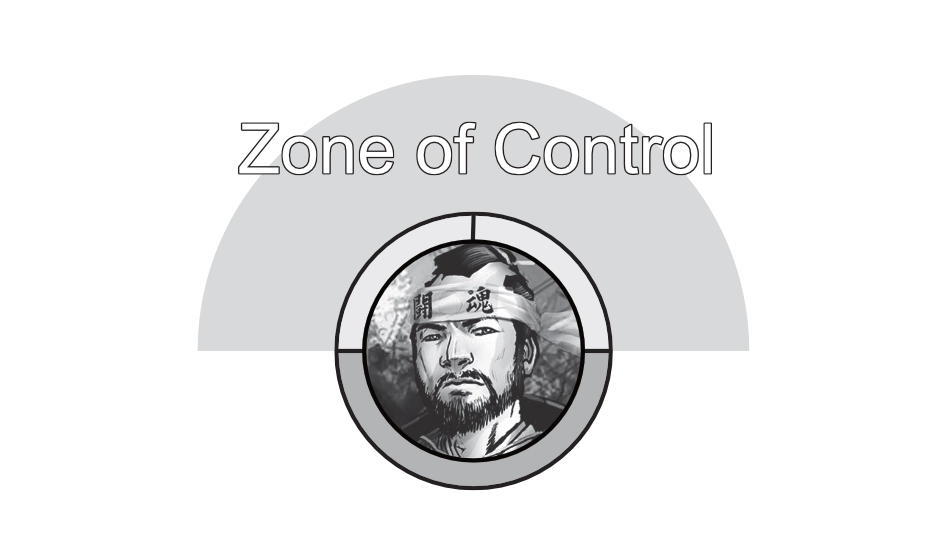
In Bushido, every model has a ZoC extending 1” from the edge of its base to any point within its [LoS](Line of Sight).
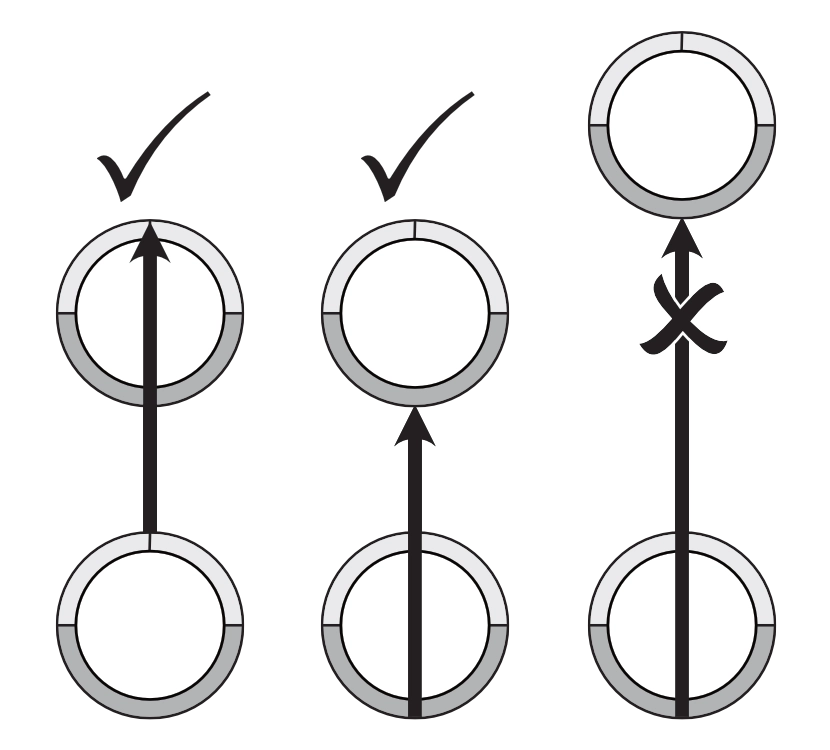
Models ignore Friendly ZoC, but once a model enters an Enemy model’s ZoC, it may only move directly towards that model, or directly away, until it leaves the ZoC.Models beginning their activations in one or more Enemy model’s ZoC must do one of the following:
- declare a Stand Up action
- declare an action that allows them to move into BtB with one of those models and move directly toward the enemy model until they reach BtB
- declare another action that allows a move
They must move directly away from the Enemy model until they leave the ZoC; or away from all models until they leave all Enemy model’s ZoC if in multiple ZoCs, after which they can move freely. Models can ignore the ZoC of Models that are in BtB with Enemy models for movement and declaring or performing actions (such as Ranged Attack Actions or Scenario Actions which otherwise cannot be performed in a ZoC). If a model moves out of BtB, then it may ignore the ZoC until that move is completed.
Link to original